There are different motor assistance levels that vary in power, acceleration, and the assistance ratio offered to the eBike. These levels provide an appropriate user experience depending on the type of use. Depending on the three parameters mentioned above, the eBike may prioritize battery saving, maximum power, or acceleration.
Assistance modes can be customized from the MySmartbike app or from the Head Unit+ configuration menu.
1.6.1 Normal assistance levels
The M40 system has four assistance levels:
| Level 0: L0 | No assistance |
| Level 1: L1 | Designed to save battery energy. Smooth acceleration and lower assistance. Ideal for long, flat rides. |
| Level 2: L2 | Provides intermediate assistance in most situations and extra support when needed. Ideal for technical routes. |
| Level 3: L3 | Provides maximum assistance, designed for tackling very demanding slopes. |
Motor assistance is always proportional to the pedaling input from the user. Depending on the selected level, the system will deliver different power.
1.6.2 Walk assistance mode
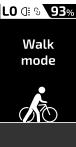
This mode allows motor assistance when pushing the eBike while walking with both hands on the handlebars. It helps, for example, to move through areas that are difficult to cycle. To use walk assistance mode, the TRIO is required. The maximum walk assistance speed is 6 km/h. If exceeded, assistance will automatically switch off. Walk assistance is activated by pressing and holding the bottom button and deactivated when released. When walk assistance mode is active, the following graphic will be displayed on the screen.
1.6.3 Changing assistance levels
Assistance levels can be switched using the following methods:
Head Unit+: using the main control button, the assistance level increases. Once the highest level is reached, pressing the button again cycles back to no assistance.
TRIO: pressing buttons 1 and 3 to increase or decrease levels. The behavior is configurable.
NOTICE
Remember that the walk assistance mode should only be used while walking, without being mounted on the eBike, with both hands holding both sides of the handlebars and with two wheels in contact with the ground to avoid injuries.
NOTICE
The manufacturer may modify the functionality of the left and right buttons. Refer to the manual of your specific model for detailed information. By pressing the button for a longer period, both walk assistance and the lights can be controlled. Due to certain specific regulations, the original manufacturer may configure the eBike’s status lights when starting the system.